Sunday, February 24, 2013

App Review: Ruzzle

For today's post, I'm going to be reviewing the popular game called Ruzzle, available on Android and iPhone/iPad/iPod Touch. This fast-paced and addicting word game is similar to Boggle, as you play by trying to find as many words as you can on a 4x4 grid. Each game consists of three two-minute rounds where players try to score as many points as possible, and the winner is whoever gets the most points by the end of all three rounds. 

Ruzzle's Login Screen


After downloading Ruzzle, you can choose to register for an account either with a username and a password or to sign in using your Facebook account. If you create an account with a username and password, you can connect to Facebook later so that you can play with your Facebook friends. 


Once you've logged in, you will see a list of games where it is your turn to play (under the "Start New Game" button), an overview of how many achievement's you've earned, and a list of games where it is your opponent's move. Underneath this, you will also see a list of the outcomes of past games (not pictured in screenshot).
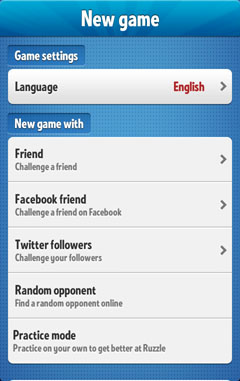


 By pressing the orange "Start a new game" button, you will be able to begin playing. You can choose to play by entering someone's username (first option) against your Facebook friends or Twitter followers, or a random opponent. There is also a practice mode, if you want to try the game without any opponents.


When it's your turn to play a round, you will see a screen similar to this when you start to play. Here, it's my turn on the third round, and you can see both my score and my opponent's for each round as well as the score for each of us on the bottom. Your opponent's score for any round will remain hidden until both of you have played in that round. From here, you can choose to either play the next round, resign, or chat with your opponent by tapping the speech bubble in the top right.


Now game-play begins! You have two minutes to find as many words as you can and get the highest score possible. Select words by tapping the first letter and then dragging over the other letters in the word, releasing over the final letter. Letters in each word must be adjacent (that is, touching on any side or diagonal), and each letter can only be used once per word. Here I drew lines illustrating the path to play the word "Note" in this game.

The Ruzzle board when play begins.
The timer is at the upper left, and your score is  top-center.
Lines showing the path to play the word "Note"


Once the round is over, you will see the number of words you played along with their point score. If your opponent has already played that round, you will also see a list of all the words they found that round. Any word in grey is a word that only one player found. When you press "Done" you'll see the score screen again, and if it's the end of Round 3, whether you've won or lost.

List of words found by each player,starting with the highest-scoring.
The final score of a game, with the option
to challenge your opponent to a rematch.


In Ruzzle, it is important to remember that its the amount of points scored that determine the winner, not the amount of words. So your strategy could be to find as many words as quickly as possible, or to try and find longer, more valuable words. Also lookout for the letter tiles with double or triple letter scores ("DL" or "TL") and tiles which double or triple your word score ("DW" and "TW"). The amount of these tiles increases which each round, so generally you'll earn more points per round as the game progresses.

Some other areas of Ruzzle worth checking out could be the Settings and Help window where you can adjust different settings, go over the tutorial, or upgrade to the premium version of the game if you have the free version; the Account Settings window where you can adjust your account information or the image used as your Ruzzle profile picture (this is the "Account Settings" button under Settings and Help; and the Achievements window, where you can see both the achievements you've unlocked as well as how to unlock the ones you haven't.


 Overall, Ruzzle is an addictive app worth downloading. You can download it for free or purchase the premium version which will remove ads and give you access to your Ruzzle statistics. Given its current popularity, you will find no shortage of opponents to play against and the short, two-minute rounds are perfect for those moments where you need a quick break. Hope you've enjoyed this review of the game!

Download Ruzzle: 
Android: Free Version | Premium Version ($1.99)
iOS: Free Version (Premium version can be bought in the app for $2.99)


Sunday, February 10, 2013

A new semester, a new beginning

Hello again everyone! I've taken a bit of a hiatus since the end of my last semester, but I'm here to give another "welcome" message to all of you as I begin the new school year!

As you might be able to guess, this blog is a place for me to talk about anything "tech," from apps and gadget reviews to websites and how-tos. I own an Android smartphone and an HP PC so my posts may tend to be directed towards the two platforms, however I do also own an iPod Touch so some things like iPhone apps may be mentioned as well for you Apple folk. =)

I welcome suggestions for anything you guys might like to learn or read about, so if there's any relatively accessible tech-related thing you want me to check out, just let me know!

Hope you enjoy what you read here!

Sunday, December 9, 2012

A follow-up

So this is where I'm supposed to discuss the responses I received from my last post. However, I did not get any (feel free to change that!) so this post won't be very exciting. =(

I feel that, in defense of having no comments on my previous post, my blog is near the bottom of the class blog-roll and I think we just tend to click on links near the top in general -- I realized I did -- and that's probably the main reason why. I can't blame them, I think it's just natural.

Also, the length of my previous post may have been a bit long and scary for some...I was hoping the dividers would help, but perhaps it still just looked like too much text.

If anyone comments I'll definitely update this post to mention what other people have, so keep checking back!

Monday, December 3, 2012

What's YOUR favorite piece of tech, site, or app?

December is here, and with that the holiday season is fast-approaching. Soon, it will be 2013 (assuming the dreaded 12/21/12 is a hoax, of course), and with that the metaphorical new beginning that accompanies a new year will arrive.

But before we turn our sights to what's to come, I want to take some time to think about that which has affected us in this previous year. In particular, what in the tech-world has made the biggest impact on you over this year?

Are there any sites or services which have become a part of your daily routine? How about a tech-gadget that you can't leave home without? Or maybe there's an app you find always open on your phone or tablet?

I want to know what's made its impact on YOU! Let me know in the comments below!


For me, my biggest change came over the summer when I got my first smartphone, an LG Lucid running Android. While I used my iPod Touch extensively before as my "poor man's smartphone," having a real smartphone has changed how I do things:
  • I can actually connect to and use my apps without explicitly needing wi-fi as I did when I used my iPod Touch. This way I can, say, connect to and use my Evernote account at almost any time.
  • I don't have an excuse to get lost or not be able to fact-check that argument (this may or may not be a con rather than a pro!)
  • I can use my social apps like Facebook and Instagram without needing to find a wi-fi network and take the time to sign into it.
Strangely, I've found that even now I forget I have access to all of these apps at any time--perhaps I have gotten so used to being restricted to wi-fi I've effectively trained myself away from thinking, "I want to take a picture of this and share it on Instagram!"

As for sites that have impacted me this year, I must say that without a doubt Gmail and Google Calendar have changed how I organize my day. I've set Gmail to effectively check all of my email, and after an initial set-up of many different filters it's a pretty painless process to check my mail and find exactly what I'm looking for. By using color-coded calendars I've managed to keep track of all of my different college classes and their assignments, and it's great to visually see what's due and when in the calendar view that way. At the very least, it's saving me during finals time this semester!

Finally, I've got to hand it over to Evernote as my "app" choice. I've tried a few different apps to keep my need of writing down small pieces of information in check, and Evernote wins mainly because I can use it anywhere. Whether it's via the site, its Windows program, or my smartphone app, I can access and store information no matter where I'm at. It's not a perfect program, but it's hard to argue with something I can use in almost any situation--even if I'm offline, I can store apps locally until they can sync.


Well, there you have it, my thoughts on the tech that has affected me most this year. Feel free to ask any questions if you want to know more about any of the items I've mentioned, and let me know in the comments below what tech has made the biggest impact on you this year! 

Sunday, September 30, 2012

Google Play offers 25 cent apps!

Google is celebrating 25 Billion app downloads to their Android devices by offering a 25-cent sale!


For a short time, Google will be changing the apps offered each day that are being sold for only a quarter each. Check it out quick and see if there are any apps you want to snag at a steep discount! It's also worth noting that some of the apps offered during previous days have retained their 25-cent price (most likely only temporarily), so if you don't see any apps that strike your fancy, it may be worth seeing if any you've had your eyes on are currently on sale!

If you want to know when other cool promotions are going on for the Google Play store, it may be worth noting that they recently launched a new Twitter specifically for Google Play, @GooglePlay. Check it out whether you're an app addict or just like to keep on top of what's happening in the world of Android Apps!

Tuesday, September 18, 2012

App Review: 100 Floors (for Android and iOS)

For my first review, I'm going to recommend a game called 100 Floors, available for both Android devices and iOS.

100 Floors is a puzzle game, where the object of each floor is to solve the puzzle that opens the door to the next level. As the name suggests, there are 100 floors to pass in order to beat the game.

The game starts off with a few "tutorial" levels which give clues as to how the game play works. Almost any aspect of manipulating your phone (or iPod Touch) can be used in this game, from poking, pinching, shaking, to adjusting the volume. Some levels could involve pressing buttons, moving and manipulating objects, deciphering clues, and any other variety of puzzle you can come up with.

As the game play continues, the puzzles get increasingly more difficult, but in my experience I've found the difficulty can very much just rely on how you think. Some floors I've passed in seconds frustrate my friends for a long time before figuring it out, or requesting a hint from me.


I've found the game to be extremely enjoyable, and am currently two floors away from beating all 100 levels. However, at times I've found the game can be super glitchy. Solutions may require super accurate actions that can be difficult to pull off, making it possible to attempt the correct solution without actually opening the door and beating the level. Other floors are just annoyingly difficult to pull off, but overall the game is very well-balanced and has plenty of different puzzles to work through, giving something for every type of puzzle-lover.


Fitting the perfect balance of frustrating and rewarding, 100 Floors is a great game to download and play when you want a distraction which works your brain.

Thursday, September 6, 2012

Welcome to Tech Geekery!

Hello there, and thanks for stopping by! I'm Alexa, and on this blog I'll be sharing thoughts, tips, and opinions on all things tech related. From Android and iPod Touch app reviews, to how-tos on more efficient computer usage,  I plan to use this blog to share a variety of information.

For some background, I'm a college student who's been really into computers, gadgets, and the web for years now. I love learning how it all works, and (cautiously) experimenting and playing around. I'm not an expert by any means, but I can easily figure out or learn anything I need to know. For a long time, I've used an iPod Touch as a "poor man's smartphone" and used it on a regular basis for apps and music. Just a month ago, my last "dumb phone" finally died, and I was lucky enough for my parents to replace it with my first smartphone -- an LG Lucid which runs Android. It's my latest tech acquisition that makes me feel like I'm finally a part of the 21st century!

I figure a "welcome" post is not as interesting as the content that's promised, so I'm going to end this here. If you have any questions or would like to suggest something you'd like covered in a blog post, just let me know! I'd love to hear from you! =)